Set up WebRTC live view with TURN

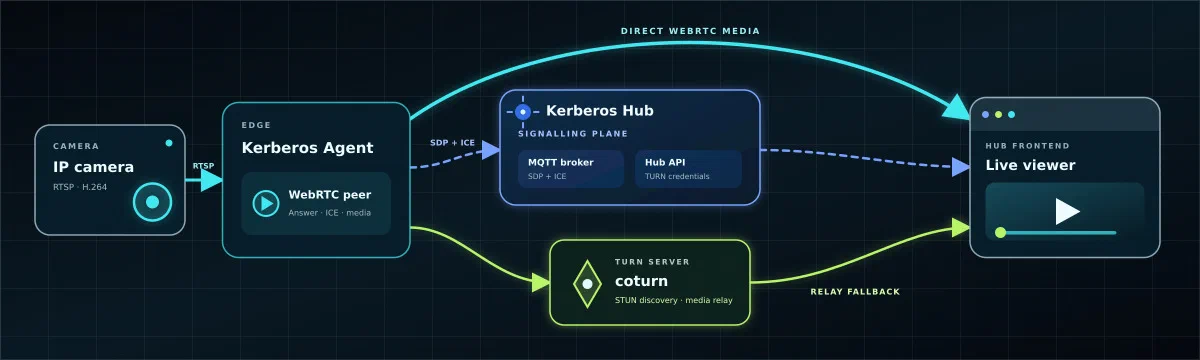
WebRTC gives Kerberos Hub its most interactive live path: low-latency H.264 video, camera audio and the two-way talk backchannel. It prefers a direct Agent-to-browser connection, but NAT and enterprise firewalls often make a TURN relay the only reliable path.
This tutorial provisions a coturn endpoint, configures the Hub Helm chart and Agent with the same credentials, then proves both normal ICE negotiation and TURN fallback.
Understand the path
MQTT carries WebRTC signalling, not media. The browser sends an SDP offer and ICE candidates through the broker, and the Agent returns its answer and candidates on the reverse topic. ICE then selects the best working media path: direct UDP first, TURN relay when direct connectivity fails.
No public inbound port is opened on an Agent. Agents, browsers and TURN all establish outbound or statefully returned traffic. The TURN server is the only additional public media service.
Before you start
You need:
- A self-hosted Hub and at least one connected Agent.
- A public VM or host for coturn. The Hub chart configures TURN but does not deploy it.
- A DNS name such as
turn.example.compointing to the TURN host. - Firewall control for the TURN listener and relay port range.
- A camera with an H.264 stream for broad browser interoperability.
- MQTT connectivity between Hub frontend and Agent for SDP/ICE signalling.
For two-way talk, the browser also needs microphone permission and the camera must support a compatible backchannel, normally G.711 µ-law (PCMU) through its ONVIF or RTSP talk path.
Configure coturn
Choose listener and relay ports
This example uses the standard TURN listener and a deliberately small relay range:
| Purpose | Protocol and port |
|---|---|
| STUN/TURN listener | UDP 3478 |
| TURN-over-TCP fallback | TCP 3478 |
| Allocated media relays | UDP 49160-49200 |
The relay range limits the firewall surface and the maximum concurrent allocations. Increase it after measuring concurrent viewers. If you configure TURN over TLS, expose a separate TLS listener such as TCP 5349 and use a certificate trusted by operator browsers.
Create the coturn configuration
Install coturn using your operating system package or container image, then start with a configuration like this:
listening-port=3478
min-port=49160
max-port=49200

realm=turn.example.com
fingerprint
lt-cred-mech
user=kerberos:replace-with-a-long-random-password

# Set this when the host is behind one-to-one NAT.
external-ip=203.0.113.20

no-multicast-peers
no-cli
Replace the hostname, public IP, username and password. Omit external-ip when coturn binds directly to its public address. Keep the password outside source control and use the same value later in Hub and Agent secrets.
Static credentials are the configuration currently consumed by Kerberos Hub. For larger deployments, rotate them regularly and plan a time-limited TURN credential service.
Open the TURN firewall
Allow these stateful rules:
| Source | Destination | Rule | Purpose |
|---|---|---|---|
| Agent and operator networks | turn.example.com | Outbound UDP/TCP 3478 | STUN discovery and TURN allocation |
| Internet or approved source ranges | TURN host | Inbound UDP/TCP 3478 | Accept STUN/TURN clients |
| Internet or approved source ranges | TURN host | Inbound UDP 49160-49200 | Carry allocated relay media |
Also allow the TURN host to send and receive UDP media through its relay range. If coturn is behind NAT, forward both the listener and the complete relay range to the host.
WebRTC may still negotiate direct UDP between Agent and browser. Networks that prohibit that path should allow the TURN rules and use the forced-relay test later in this tutorial.
Test coturn independently
From a machine outside the TURN host network, use coturn’s client utility:
turnutils_uclient \
  -y \
  -u kerberos \
  -w 'replace-with-a-long-random-password' \
  -p 3478 \
  turn.example.com
Run the test over the transports you intend to support. Resolve listener, credential and relay-range failures here before involving Hub or an Agent.
Configure Hub
Add TURN and live-view settings to the values file used by your Hub release:
turn:
  host: "turn:turn.example.com:3478"
  username: "kerberos"
  password: "replace-with-a-long-random-password"

kerberoshub:
  frontend:
    features:
      liveview:
        liveStreamMode: "webrtc"
        hlsEnabled: "true"
        moqEnabled: "false"
The chart renders only TURN_SERVER into the public frontend configuration. It gives TURN_USERNAME and TURN_PASSWORD to Hub API, which returns them through authenticated /runtime/config after login; the credentials are not written to the public env.js file.
Keeping HLS enabled gives operators a TCP/HTTPS fallback when WebRTC is blocked entirely.
Apply the values:
helm repo add kerberos https://charts.kerberos.io
helm repo update
helm upgrade hub kerberos/hub \
  --namespace kerberos-hub \
  --values values.yaml
kubectl -n kerberos-hub rollout status deployment/hub-api
kubectl -n kerberos-hub rollout status deployment/hub-frontend
Use your actual Helm release and namespace names if they differ.
Configure each Agent
The Agent must use the same coturn listener and credentials:
env:
  - name: AGENT_STUN_URI
    value: "stun:turn.example.com:3478"
  - name: AGENT_TURN_URI
    value: "turn:turn.example.com:3478"
  - name: AGENT_TURN_USERNAME
    value: "kerberos"
  - name: AGENT_TURN_PASSWORD
    valueFrom:
      secretKeyRef:
        name: agent-turn
        key: password
Factory-managed Agents persist the STUN URI, TURN URI, username and password from their camera configuration. Prefer that durable configuration path. For a direct Kubernetes test, set the variables on the Agent Deployment and then move them into the owning template or Secret:
kubectl -n <agent-namespace> set env deployment/<agent-deployment> \
  AGENT_STUN_URI=stun:turn.example.com:3478 \
  AGENT_TURN_URI=turn:turn.example.com:3478 \
  AGENT_TURN_USERNAME=kerberos \
  AGENT_TURN_PASSWORD='replace-with-a-long-random-password'
kubectl -n <agent-namespace> rollout status deployment/<agent-deployment>
Avoid command-line secrets in production because they can enter shell history. The explicit command is useful only for a short-lived test.
Verify the normal ICE path
- Open Hub in a browser, select a camera, choose Live, then choose WebRTC from the transport menu.
- Hover the live status indicator and open its Signalling and Network tabs.
- Confirm the signalling phases progress through offer, candidate gathering, connecting and connected.
- Inspect the selected connection type:
| Hub diagnostic | Meaning |
|---|---|
Direct | Host candidates produced a direct path |
NAT (STUN) | A server-reflexive candidate traversed NAT |
NAT (Peer) | A peer-reflexive path was discovered during checks |
Relay (TURN) | Media is flowing through coturn |
The browser console also emits structured messages prefixed with [WebRTC-diag]. Chromium’s chrome://webrtc-internals page provides the selected candidate pair, codec, bitrate, RTT, jitter and packet-loss history.
Agent logs should show a WebRTC request and the configured TURN URI:
kubectl -n <agent-namespace> logs deployment/<agent-deployment> \
  --follow | grep -i -E 'webrtc|turn|ice'
Prove TURN fallback
A successful direct connection does not prove the relay works. Temporarily force the Agent to publish relay candidates only:
kubectl -n <agent-namespace> set env deployment/<agent-deployment> \
  AGENT_FORCE_TURN=true
kubectl -n <agent-namespace> rollout status deployment/<agent-deployment>
Reconnect the WebRTC stream and confirm Hub reports Relay (TURN) and relay candidates. Then return to normal ICE selection unless policy requires every stream to use TURN:
kubectl -n <agent-namespace> set env deployment/<agent-deployment> \
  AGENT_FORCE_TURN=false
Factory does not currently emit AGENT_FORCE_TURN, so place a permanent setting in the deployment mechanism that owns the Agent or expect Factory reconciliation to remove a manual override.
Test two-way talk
With WebRTC video connected:
- Grant microphone permission to Hub.
- Press and hold the talk control.
- Confirm audio reaches the camera speaker without stopping video.
- Check the Agent logs for backchannel codec or camera-write errors if it does not.
Talk is a separate camera capability. A healthy WebRTC video path does not guarantee that the camera accepts backchannel audio.
Troubleshoot common failures
| Symptom | Check |
|---|---|
| Signalling never leaves offer | Browser and Agent MQTT connectivity, cloud key and request-hd-stream messages |
| Host candidates only | STUN hostname/port, UDP 3478 and coturn listener logs |
| TURN authentication fails | Hub and Agent username/password match coturn exactly |
| Relay candidates exist but media fails | Public external-ip, UDP relay range forwarding and TURN egress rules |
| Works on LAN but not remotely | NAT mapping, public DNS and relay-range firewall |
| TURN/UDP fails but TCP works | UDP 3478 blocked; expect more latency over TURN/TCP |
| Video connects but no frame appears | Camera emits H.264 and a fresh keyframe; inspect Agent codec logs |
| Talk control fails | Browser microphone permission and camera PCMU/ONVIF backchannel support |
| Every viewer uses TURN | Direct UDP is blocked or candidate priority/network policy prefers relay |
TURN bandwidth is approximately one inbound and one outbound media stream per relayed viewer. Monitor both directions and size the host, relay range and network egress for peak simultaneous live views.
For an HTTPS-only alternative that needs no ICE or TURN, continue with Set up HLS live view. For a protocol comparison, read Choose a live-stream transport: MoQ vs HLS vs WebRTC.