Deploy a MoQ relay on Kubernetes

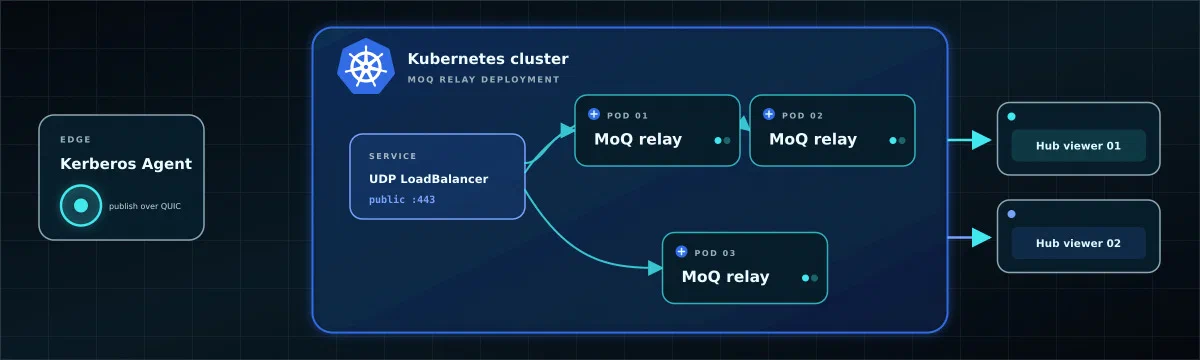
A self-hosted Media over QUIC (MoQ) relay gives Kerberos Agents and Hub viewers one low-latency meeting point. The Agent publishes each live camera broadcast to the relay; browsers subscribe to the same broadcast without opening a peer-to-peer connection to the Agent.
This tutorial deploys a single MoQ relay on Kubernetes, gives it a trusted TLS certificate and public UDP endpoint, then configures the Hub Helm chart and an Agent Deployment to use it.
Understand the path
The relay is on the media path; the Hub API is not. Hub tells the browser which relay and broadcast prefix to use, while the Agent and browser each create their own WebTransport connection to the relay over HTTP/3 and QUIC.
The https:// relay URL identifies a secure HTTP origin, but this media path is not TCP. Browser WebTransport uses HTTP/3 over QUIC and UDP. A conventional HTTP Ingress, TCP reverse proxy or TLS terminator is therefore not enough; UDP must reach the relay pod and the relay must terminate TLS itself.
Before you start
You need:
- A Kubernetes cluster where a
LoadBalancerService can expose UDP 443. Cloud UDP load balancers and MetalLB are common options. kubectlaccess to create a namespace, Deployment, ConfigMap, Secret and Service.- A hostname such as
moq.example.comthat you can point at the LoadBalancer. - A publicly trusted TLS certificate for that hostname. The example uses cert-manager with an existing DNS-01
ClusterIssuer. - Helm access to your Hub release.
- An Agent image at v3.9.2 or newer. Older Factory defaults can predate the MoQ publisher.
- Chromium-based operator browsers with outbound UDP 443 access to the relay.
moqdev/moq-relay:0.14.7. Kerberos Agent v3.9.2 and newer use moq-go v0.5.7, backed by moq-ffi v0.3.7; relay v0.14.7 was released from the same upstream development window. MoQ is evolving quickly, so test Agent publishing and Hub playback before changing the relay, Agent SDK or @moq/watch version independently.Deploy the relay
Choose the hostname and namespace
This tutorial uses:
| Setting | Example |
|---|---|
| Kubernetes namespace | moq |
| Public hostname | moq.example.com |
| Public endpoint | https://moq.example.com/anon |
| Public transport | UDP 443 |
| Relay container port | UDP 4443 |
| Broadcast prefix | devices |
Replace moq.example.com everywhere below. Keep /anon and devices consistent across relay, Hub and Agent configuration.
Issue the TLS certificate
Create the namespace and a cert-manager Certificate. Use a DNS-01 issuer because an HTTP-01 challenge needs a separate TCP HTTP route that this relay Service does not provide.
apiVersion: v1
kind: Namespace
metadata:
  name: moq
---
apiVersion: cert-manager.io/v1
kind: Certificate
metadata:
  name: moq-relay
  namespace: moq
spec:
  secretName: moq-relay-tls
  dnsNames:
    - moq.example.com
  issuerRef:
    kind: ClusterIssuer
    name: letsencrypt-production
Apply it and wait for the Secret:
kubectl apply -f moq-certificate.yaml
kubectl -n moq wait certificate/moq-relay --for=condition=Ready --timeout=5m
kubectl -n moq get secret moq-relay-tls
If cert-manager is unavailable, create the same Secret name from an existing full certificate chain and private key:
kubectl create namespace moq
kubectl -n moq create secret tls moq-relay-tls \
  --cert=fullchain.pem \
  --key=privkey.pem
Browsers do not offer a general “skip TLS verification” option for WebTransport. Use a certificate trusted by the operator browsers and whose subject matches the relay hostname.
Create the relay configuration
The relay listens for QUIC on UDP 4443 inside the pod. It also starts two cluster-only TCP listeners: port 8080 for debugging broadcasts and port 9101 for health and metrics.
The working Kerberos integration currently connects to the anonymous /anon route, so this reference configuration grants unauthenticated publish and subscribe access below that path.
apiVersion: v1
kind: ConfigMap
metadata:
  name: moq-relay
  namespace: moq
data:
  relay.toml: |
    [log]
    level = "info"

    [server]
    listen = "[::]:4443"

    [server.tls]
    cert = "/etc/moq/tls/tls.crt"
    key = "/etc/moq/tls/tls.key"

    [web.http]
    listen = "0.0.0.0:8080"

    [internal]
    listen = "0.0.0.0:9101"

    [auth]
    public = "anon"
---
apiVersion: apps/v1
kind: Deployment
metadata:
  name: moq-relay
  namespace: moq
spec:
  replicas: 1
  strategy:
    type: Recreate
  selector:
    matchLabels:
      app: moq-relay
  template:
    metadata:
      labels:
        app: moq-relay
    spec:
      securityContext:
        runAsNonRoot: true
        runAsUser: 65532
        runAsGroup: 65532
        fsGroup: 65532
        seccompProfile:
          type: RuntimeDefault
      containers:
        - name: relay
          image: moqdev/moq-relay:0.14.7
          imagePullPolicy: IfNotPresent
          args:
            - /etc/moq/relay.toml
          ports:
            - name: quic
              containerPort: 4443
              protocol: UDP
            - name: debug
              containerPort: 8080
              protocol: TCP
            - name: internal
              containerPort: 9101
              protocol: TCP
          readinessProbe:
            httpGet:
              path: /health
              port: internal
            initialDelaySeconds: 3
            periodSeconds: 10
          livenessProbe:
            httpGet:
              path: /health
              port: internal
            initialDelaySeconds: 10
            periodSeconds: 20
          resources:
            requests:
              cpu: 100m
              memory: 128Mi
            limits:
              memory: 1Gi
          securityContext:
            allowPrivilegeEscalation: false
            readOnlyRootFilesystem: true
            capabilities:
              drop:
                - ALL
          volumeMounts:
            - name: config
              mountPath: /etc/moq/relay.toml
              subPath: relay.toml
              readOnly: true
            - name: tls
              mountPath: /etc/moq/tls
              readOnly: true
      volumes:
        - name: config
          configMap:
            name: moq-relay
        - name: tls
          secret:
            secretName: moq-relay-tls
            defaultMode: 0440
---
apiVersion: v1
kind: Service
metadata:
  name: moq-relay
  namespace: moq
spec:
  type: LoadBalancer
  selector:
    app: moq-relay
  ports:
    - name: webtransport
      protocol: UDP
      port: 443
      targetPort: quic
Apply the manifest and wait for the pod:
kubectl apply -f moq-relay.yaml
kubectl -n moq rollout status deployment/moq-relay
kubectl -n moq get pods,service
The single replica is intentional. Multiple independent relay pods do not automatically share broadcasts. Do not increase replicas behind a generic UDP LoadBalancer unless you also configure relay clustering and verify that publishers and subscribers can discover each other across nodes.
Publish DNS and open UDP 443
Get the LoadBalancer address:
kubectl -n moq get service moq-relay \
  -o jsonpath='{.status.loadBalancer.ingress[0].ip}{.status.loadBalancer.ingress[0].hostname}{"\n"}'
Create an A, AAAA or CNAME record for moq.example.com, depending on what your provider returns. Some Kubernetes platforms require provider-specific Service annotations before they create a UDP-capable LoadBalancer; use the annotations documented by that provider.
Give the firewall team these rules:
| Source | Destination | Rule | Purpose |
|---|---|---|---|
| Internet or approved site ranges | Relay LoadBalancer | Inbound UDP 443 | Accept Agent publishers and browser subscribers |
| Agent networks | moq.example.com | Outbound UDP 443 | Publish live broadcasts |
| Operator networks | moq.example.com | Outbound UDP 443 | Subscribe through WebTransport/HTTP/3 |
Return traffic is stateful. No public TCP media port and no inbound Agent port are required. Do not place the relay behind a normal HTTP Ingress unless that implementation explicitly passes QUIC/UDP through to the pod.
Verify the relay inside the cluster
Check the health endpoint and logs before changing Hub or an Agent:
kubectl -n moq port-forward deployment/moq-relay 9101:9101In another terminal:
curl --fail http://127.0.0.1:9101/health
kubectl -n moq logs deployment/moq-relay --tail=100
The health response is ok. This proves that the process loaded its configuration and certificate; it does not prove that public UDP 443 reaches the pod. The end-to-end Agent and browser test later in this tutorial verifies that path.
Configure Hub
Add the MoQ settings to the values file used by your Hub release:
kerberoshub:
  frontend:
    features:
      liveview:
        liveStreamMode: "moq"
        hlsEnabled: "true"
        moqEnabled: "true"
        moqRelayUrl: "https://moq.example.com/anon"
        moqBroadcastPrefix: "devices"
liveStreamMode makes MoQ the initial transport for Live mode. moqEnabled exposes MoQ in the transport selector, and keeping hlsEnabled gives operators a TCP/HTTPS fallback on networks that block UDP.
Apply the values to an existing hub release in kerberos-hub:
helm repo add kerberos https://charts.kerberos.io
helm repo update
helm upgrade hub kerberos/hub \
  --namespace kerberos-hub \
  --values values.yaml
kubectl -n kerberos-hub rollout status deployment/hub-frontend
If your release or namespace has a different name, use those values instead. The chart renders the relay URL and prefix into the frontend Deployment; browsers read them at runtime.
Configure each Agent
The Hub chart does not deploy edge Agents. Add the following variables to every Agent Deployment through the mechanism that owns it:
env:
  - name: AGENT_LIVE_MOQ_ENABLED
    value: "true"
  - name: AGENT_LIVE_MOQ_URL
    value: "https://moq.example.com/anon"
  - name: AGENT_LIVE_MOQ_BROADCAST_PREFIX
    value: "devices"
For an existing Kubernetes Deployment, you can test the settings directly:
kubectl -n <agent-namespace> set env deployment/<agent-deployment> \
  AGENT_LIVE_MOQ_ENABLED=true \
  AGENT_LIVE_MOQ_URL=https://moq.example.com/anon \
  AGENT_LIVE_MOQ_BROADCAST_PREFIX=devices
kubectl -n <agent-namespace> rollout status deployment/<agent-deployment>
Factory does not currently emit AGENT_LIVE_MOQ_* variables for managed Agents. Put these values into the durable Agent Deployment template or automation as well; a manual patch can be lost when Factory recreates or upgrades the Deployment.
By default the Agent publishes two video-only H.264 broadcasts when they have subscribers:
| Quality | Broadcast below /anon |
|---|---|
| High | devices/<agent-key>/live.hang |
| Low | devices/<agent-key>/live-low.hang |
Set AGENT_LIVE_MOQ_QUALITY=high or low only when you intentionally want to publish one tier. A viewer that selects the omitted tier will find no broadcast.
Verify live playback
Watch the Agent logs while opening the camera in Hub:
kubectl -n <agent-namespace> logs deployment/<agent-deployment> \
  --follow | grep -i moq
Look for
cloud.runLiveStreamMoQ()publishing the high or low stream to your relay. Connection errors usually point to DNS, UDP 443, TLS trust or relay authorization.Inspect announced broadcasts through the relay’s private debug listener:
kubectl -n moq port-forward deployment/moq-relay 8080:8080
curl http://127.0.0.1:8080/announced/anon/devices
The Agent publishes on demand, so open a MoQ live view before expecting both quality tiers to remain active.
In a Chromium-based browser, open Hub, select a camera and choose Live and MoQ. Confirm that the first frame appears after a fresh H.264 keyframe.
In browser developer tools, check for WebTransport or QUIC errors. A working Hub UI over TCP 443 does not prove that the browser can reach relay UDP 443.
Troubleshoot the common failures
| Symptom | Check |
|---|---|
| Relay pod is pending | moq-relay-tls exists, its keys are tls.crt and tls.key, and the image supports the node architecture |
| LoadBalancer has no address | The Kubernetes provider supports UDP Services and has any required annotations or MetalLB address pool |
| Agent repeatedly reconnects | DNS resolution, outbound UDP 443, certificate hostname/chain and relay logs |
| Agent connects but no broadcast appears | AGENT_LIVE_MOQ_ENABLED=true, Agent v3.9.2+, non-empty Agent key and H.264 input |
| Broadcast appears but browser times out | Operator network allows UDP 443 and the browser supports WebTransport over HTTP/3 |
| Browser connects but waits for video | Wait for a fresh H.264 keyframe; inspect camera GOP interval and Agent stale-packet warnings |
| Low quality is missing | Configure a camera substream or remove AGENT_LIVE_MOQ_QUALITY=high |
| Some sessions fail after scaling | Return to one replica or configure and test a proper relay cluster |
Useful commands:
kubectl -n moq describe service moq-relay
kubectl -n moq get endpointslice -l kubernetes.io/service-name=moq-relay
kubectl -n moq logs deployment/moq-relay --follow
kubectl -n moq get events --sort-by=.lastTimestamp
Harden the deployment
The /anon route allows anyone who can reach the relay to publish and subscribe below that path. Agent keys make broadcast names harder to guess, but they are not authorization.
For a controlled trial, restrict LoadBalancer source ranges and firewall rules to known Agent and operator networks. For an internet-facing production service, replace anonymous access with short-lived, path-scoped publisher and subscriber tokens. That requires a credential flow which gives each Agent a device-scoped publisher URL and each browser a subscriber-scoped URL; the current static Hub Helm and Agent environment values do not provide that lifecycle by themselves.
Also add production controls appropriate to your environment:
- Scrape the private port 9101
/metricsendpoint and alert on restarts, resource pressure and failed sessions. - Set CPU and memory after measuring concurrent publishers, subscribers and egress; the example values are starting points.
- Keep debug port 8080 private and protect it with a NetworkPolicy if other cluster tenants are untrusted.
- Back up the relay manifest and pin the image by digest when your release process requires immutable artifacts.
- Test certificate rotation. Relay
v0.14.7watches certificate files for new connections, while existing QUIC sessions keep their original identity. - Keep HLS enabled as the operational fallback for networks that block HTTP/3 or UDP.
For the transport tradeoffs and complete firewall comparison, read Choose a live-stream transport: MoQ vs HLS vs WebRTC.