Installation
Kerberos Hub is the single pane of glass for your Agents. It comes with a best of breed open source technology stack, a modular design and out-of-the-box scalability. Kerberos Hub allows building and maintaining an ever-growing video streaming and analytics landscape.
No matter how many Agents you have running in the field Kerberos Hub will manage it.
Helm and Kubernetes
Kerberos Hub is composed of a couple of microservices which are all installed in a Kubernetes cluster. Because we are handling with many containers, we can benefit from package managers such as Helm to deploy our resources more easily. In the near future we might use the Kubernetes operator as well.
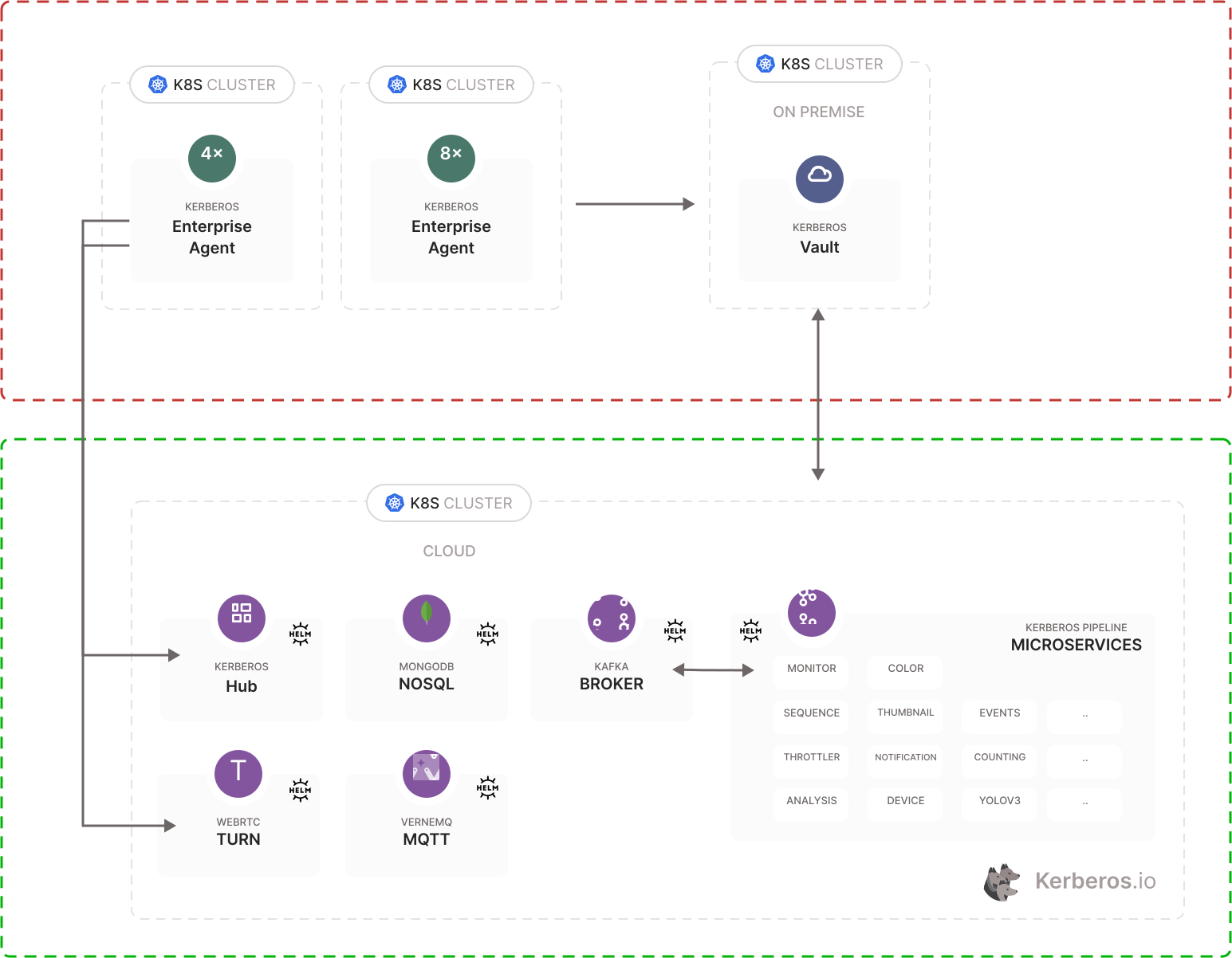
Kerberos Hub is composed out of different microservices.
Dependencies
Within the Kerberos Hub architecture we use a couple of third-party, open source, technologies such as:
- MongoDB,
- Kafka,
- Pion Turn / Coturn,
- and Vernemq
Installation
To install Kerberos Hub, we will redirect you to the official Github repository, kerberos-io/hub. This repository includes all the instructions needed to get Kerberos Hub up and running.
Configuration
When successfully installed the Kerberos Hub Helm chart, it is time to configure the solution to your needs. Learn more about the configuration here.
Google Places address autocomplete
Kerberos Hub uses the Places API (New) Data API to suggest addresses while keeping the Hub address input and dropdown interface. A key configured only for the legacy Places API does not enable autocomplete.
Configure the Google Cloud project that owns the browser API key:
- Confirm that billing is enabled for the project.
- Enable Maps JavaScript API.
- Enable Places API (New).
- Open APIs & Services → Credentials and select the key used by Hub.
- Under Application restrictions, select Websites and add every Hub origin as an HTTP referrer, for example
https://hub.example.com/*. For local development, add the exact origin shown in the browser address bar, such ashttp://localhost:4200/*. Remote development environments may forward the frontend to another local port, such ashttp://localhost:4201/*; that forwarded origin must be allowed separately. - Under API restrictions, select Restrict key and allow both Maps JavaScript API and Places API (New).
- Save the key and allow several minutes for the changes to propagate.
Set the key in the Hub Helm values:
kerberoshub:
  frontend:
    googlemaps:
      apikey: "YOUR_BROWSER_API_KEY"
Apply the values through your normal GitOps deployment, or upgrade a directly managed Helm release:
helm upgrade --install hub kerberos-io/hub \
  --namespace kerberos-hub \
  --values values.yaml
The chart passes this value to the frontend as GOOGLEMAPS_KEY. Although a
browser API key is visible to users of the application, it must still be
protected with website and API restrictions. Do not use an unrestricted key.
To verify the setup, open a Hub address field and start typing. Place suggestions
should appear without replacing or resizing the input. If no suggestions appear,
inspect the browser console for ApiNotActivatedMapError,
RefererNotAllowedMapError, RpcError, or request-denied messages. These
indicate a missing API, an incorrect website restriction, or a key from a
different Cloud project.