Avigilon Alta vs UUG: cloud video service or composable stack?
How Avigilon Alta Video and UUG compare on camera reuse, local and cloud storage, analytics, integrations, resilience and operating responsibility.
The choice between a cloud video service and a modular video stack is rarely about whether either can show a live camera. The more useful questions are how existing cameras connect, where recordings and backups live, how events reach other applications, and who owns the operating work.
Avigilon Alta Video and UUG approach that decision from different directions. Alta Video combines cloud-managed video operations with supported cameras, Cloud Connectors, analytics and integrations. UUG separates capture, persistence, fleet management and the application layer into components that can be deployed around a particular infrastructure.
That is not a simple contest between a closed cloud and an open platform. Alta offers APIs, integrations and external storage options of its own. The meaningful distinction is the supported service an organisation consumes versus the system it chooses to compose and operate.
This is a first-party comparison from the team behind UUG, based on the official documentation linked below. It is not an independent benchmark, a claim of feature parity, or a claim that either platform is universally cheaper. Alta capabilities depend on the devices, licences and configuration; UUG capabilities depend on the deployed components and service offering.
What is actually being compared?
Avigilon Alta is Motorola Solutions’ cloud-native security platform. This article focuses on Alta Video, the video management offering. Some documentation still uses the Ava or Alta Aware names.
Alta Video is not Avigilon Unity, the separate on-premises product family. Nor is it interchangeable with Alta Access, the access-control offering. An integrated video and access-control deployment can be valuable, but it does not make every door-management feature part of a standalone video subscription.
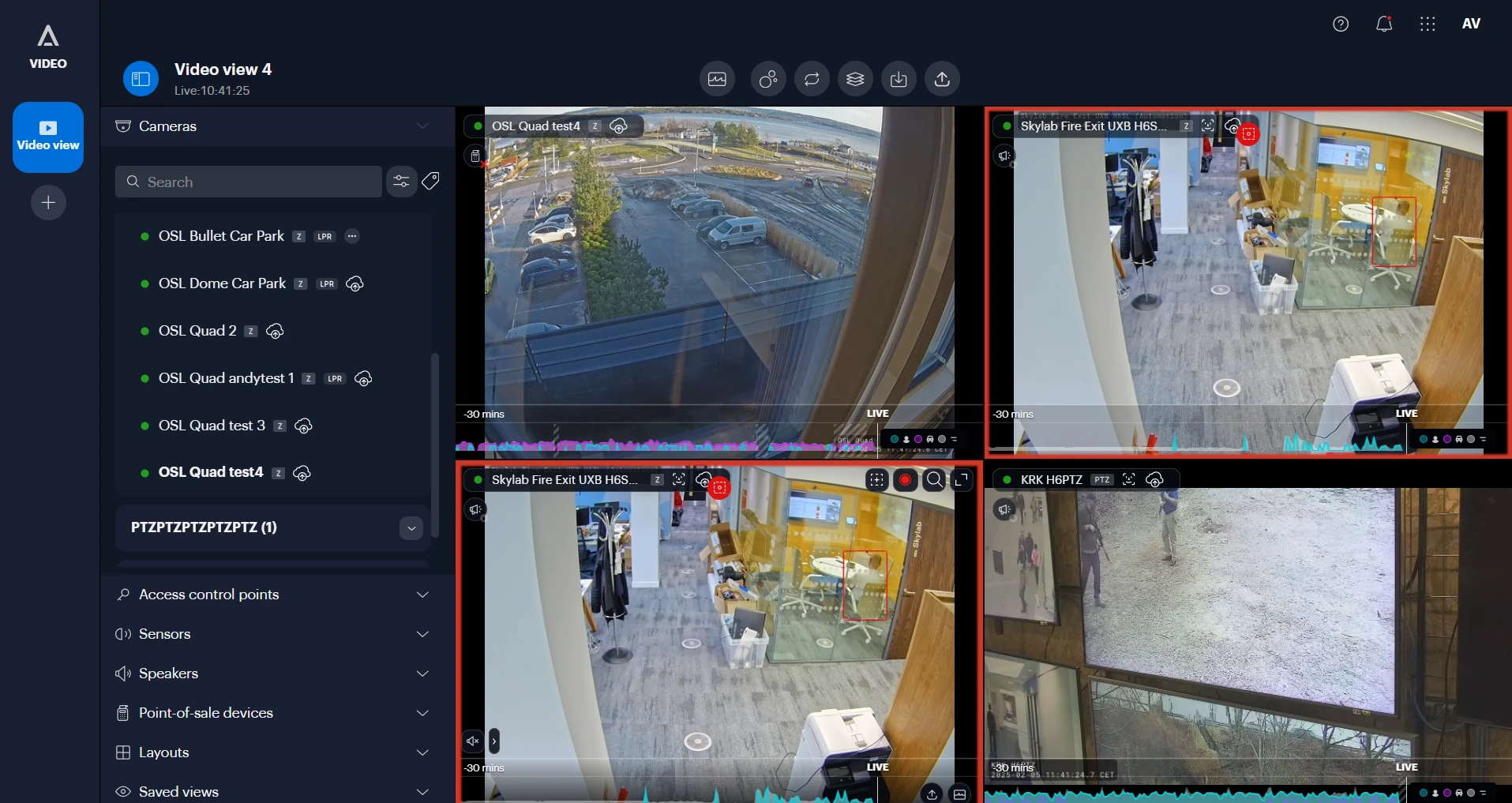
Alta Video’s Video view tool, as shown in the Avigilon documentation. Screenshot copyright Avigilon Corporation.
Select any application screenshot to view it at full size. These documentation examples are not a matched test deployment; interfaces vary by version and configuration.
UUG is built around four responsibilities:
| Component | Role in the stack |
|---|---|
| Agent (Agent documentation) | Connects to and records one camera stream, with a local interface. |
| Vault (Vault documentation) | Receives recordings, persists them to configured storage and publishes integration events. |
| Factory (Factory documentation) | Deploys and configures Agents on Kubernetes. |
| Hub (Hub documentation) | Provides the shared workspace for devices, live view, recordings, alerts and workflows. |
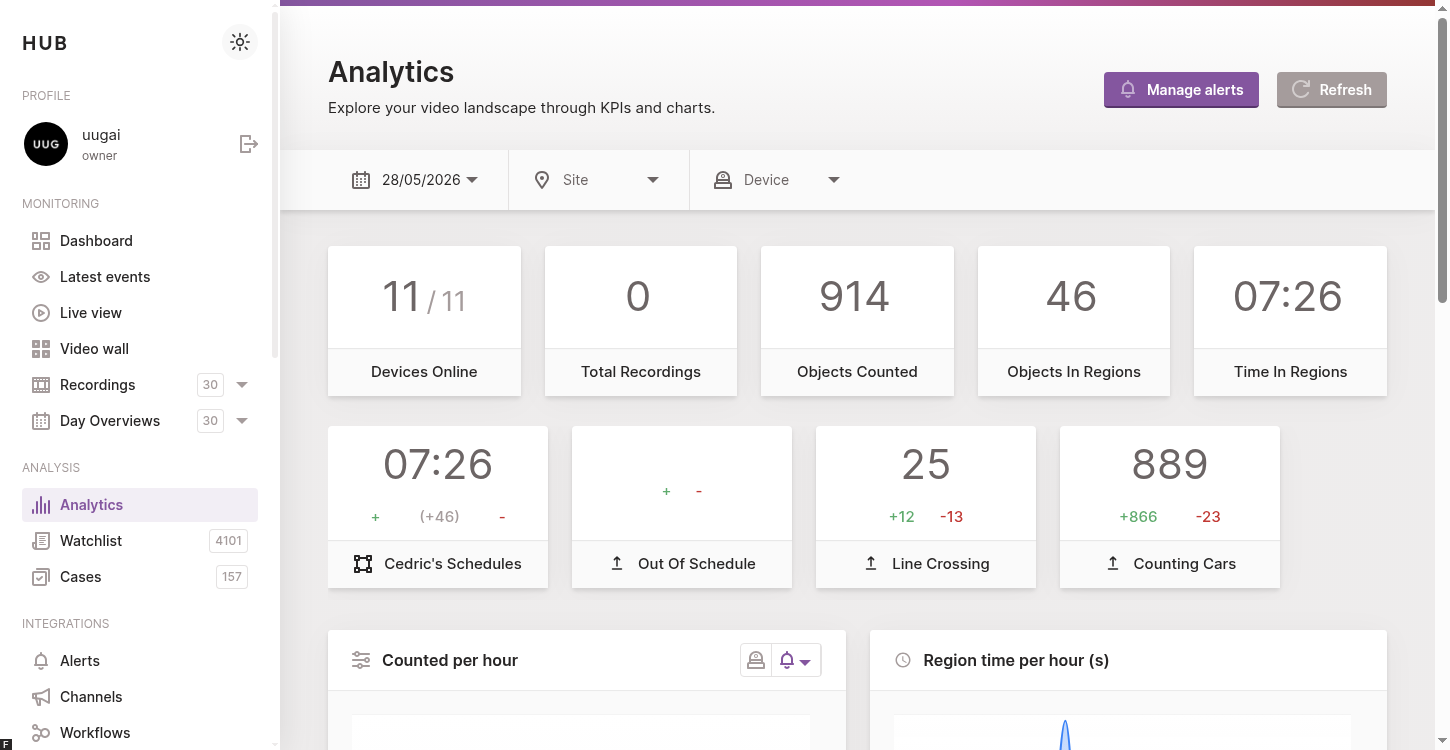
UUG Hub’s analytics dashboard, showing device availability, counting and region metrics in an example deployment. Application screenshot from the Hub analytics guide (Hub documentation).
These are building blocks rather than four mandatory installations for every camera. Agent can work independently; Factory is relevant to Kubernetes-based Agent fleets. A hosted offering and a self-hosted deployment also place different responsibilities on the customer.
Commercially, Alta Video combines the application and vendor-operated cloud service in a subscription. With UUG, costs and operating responsibilities depend on whether the deployment is hosted or self-managed.
The comparison at a glance
| Dimension | Avigilon Alta Video | UUG |
|---|---|---|
| Starting point | Cloud-managed video operations with supported devices and integrations. | A modular video platform with hosted and self-hosted options. |
| Camera connection | Cloud-native Alta cameras, or supported third-party cameras through Cloud Connectors. | An Agent per camera stream, with optional Factory-based fleet management. |
| Local recording | Camera media or Cloud Connector storage, depending on the device path. | Local Agent recording, with configured upload and persistence paths. |
| Off-device storage | Alta Cloud Storage and Storage Connect options, including external S3-compatible storage and licensed CIFS backup. | Vault-backed persistence to configured storage in a composed deployment. |
| AI and model choice | Packaged video and audio capabilities, with availability dependent on hardware and offering. | Bring your own AI models through custom workflow stages, with conditional processing and supported results returned to Hub. |
| Integrations | APIs, rule webhooks, marketplace integrations and links to the broader Alta ecosystem. | Integration events, Hub workflows and structured results returned by processing stages. |
| Operator experience | Cloud-managed web and mobile applications. | Hub provides central operations; responsibility for its services depends on the offering. |
| Evidence | Documented export-integrity verification, subject to the export format and verifier. | Recording integrity verification, with origin assurance dependent on appropriate signing keys. |
| Main operating question | Does the supported service meet the camera, storage and integration requirements? | Does the chosen composition meet the requirements, and who will run it? |
A managed experience versus explicit component boundaries
Alta Video’s attraction is a coherent service boundary. A team can manage cameras, search recordings, investigate events and work across sites without deploying its own central video application.
Cloud-native cameras can connect into that experience directly. Cloud Connectors bring supported third-party cameras into it, providing on-site storage, processing and analytics. Moving central management to the cloud does not eliminate edge hardware, disks, camera networks or their maintenance.
UUG makes the component boundaries more visible. Agent handles capture, Vault handles persistence and integrations, Hub provides the application layer, and Factory manages Agents on Kubernetes. Those boundaries can be useful when capture, storage and processing need different placement or lifecycle decisions.
The trade-off is operating responsibility. In a self-hosted stack, container updates, database backups, message-broker capacity, monitoring and restoration tests need an owner. A hosted service can move some of that work to a provider, but its scope should be confirmed rather than assumed.
The decision is less about avoiding infrastructure than choosing which infrastructure decisions remain yours.
Reusing cameras is possible on both sides
It would be misleading to describe Alta as requiring every existing camera to be replaced. Cloud Connectors are specifically intended to bring supported third-party cameras into Alta Video, with their own sizing and storage requirements.
Equally, an available camera stream is not proof of full functional compatibility. For either platform, the useful unit of comparison is camera model, firmware, stream profile and required function.
With Alta, cloud-native and third-party camera paths should be evaluated separately. With Agent, RTSP availability is a starting point, while codecs, audio, PTZ, ONVIF functions and browser playback have their own constraints. The Agent camera guide describes that stream-based model.
The practical distinction is not “existing cameras versus new cameras.” It is the supported connection path, the processing required at the site, and the functions the operator actually needs.
Storage flexibility is not exclusive to a modular stack
Alta’s Cloud Storage documentation describes recordings stored remotely as well as locally on cloud-native cameras or Cloud Connectors. A cloud-managed application does not mean every recording exists only in a provider’s cloud.
Alta also documents alternatives to provider-hosted backup:
- External S3-compatible storage through Storage Connect, with backup scheduling and bandwidth controls.
- Local CIFS storage for additional video copies. The documentation identifies an Alta Storage Connect licence requirement.
Those options matter. An organisation that needs external recording storage should not dismiss Alta on the assumption that it cannot use it. Licensing, supported destinations, retention and backup throughput still need to match the proposal. Storage Connect also does not turn Alta Video into a self-hosted application.
In a Vault-based UUG deployment, the recording path is camera → Agent → Vault → configured storage, with integration events feeding Hub separately. Factory is a management component, not an upload hop.
The difference is therefore more specific than “Alta uses cloud storage; UUG lets you choose.” Alta offers storage choices within its supported service; UUG makes recording persistence a separately deployed component of the wider stack.
Neither architecture establishes data residency on its own. Recording location is only one part of the assessment: application metadata, backups, shared evidence and external processing requests also matter. External storage access controls, encryption settings and retention policies remain part of the operator’s design.
AI: packaged analytics versus custom-model workflows
Alta Video advertises video and audio analytics, search, rules and integrations within a managed operator experience. Cloud Connectors extend processing to supported third-party camera deployments. Specific capabilities and capacity still depend on the hardware and commercial offering.
That is a strong proposition when the required analytic is already a supported feature: model behaviour, search and operator tools sit inside a maintained product experience.
UUG’s key AI differentiator is that your own models can become part of the video workflow. Hub workflows (Hub documentation) let a team integrate a specialist model it trained, an existing inference service or a vision-language model, then use its outputs in the application rather than maintaining a separate AI-results dashboard.
What custom AI looks like in UUG
- Bring your own models. A custom stage (Hub documentation) wraps the model in a worker, in Python, Go, Node.js or another suitable language. It can execute inference itself or call a model-serving endpoint; this is model integration, not model training or browser-based weights upload.
- Chain AI stages. Camera, site and schedule conditions select relevant recordings. An earlier stage’s results can gate later processing, allowing a general detector and a specialist model to serve different roles in the same workflow.
- Choose where inference runs. Internal workers can run alongside a self-hosted Hub. External stages (Hub documentation) connect customer-managed workers over RabbitMQ or HTTPS, with an authenticated callback to return their outputs.
- Bring results back into Hub. Supported result blocks (Hub documentation) persist detections, timeline markers or recording metadata updates such as descriptions. Stage outputs can also drive subsequent routing decisions.
For example, a logistics workflow could select recordings containing people, run a custom PPE detector, and attach a marker to footage that needs review. A separate vision-language model could add a scene description. These are examples a team can build with its own workers, not bundled or prevalidated specialist models.
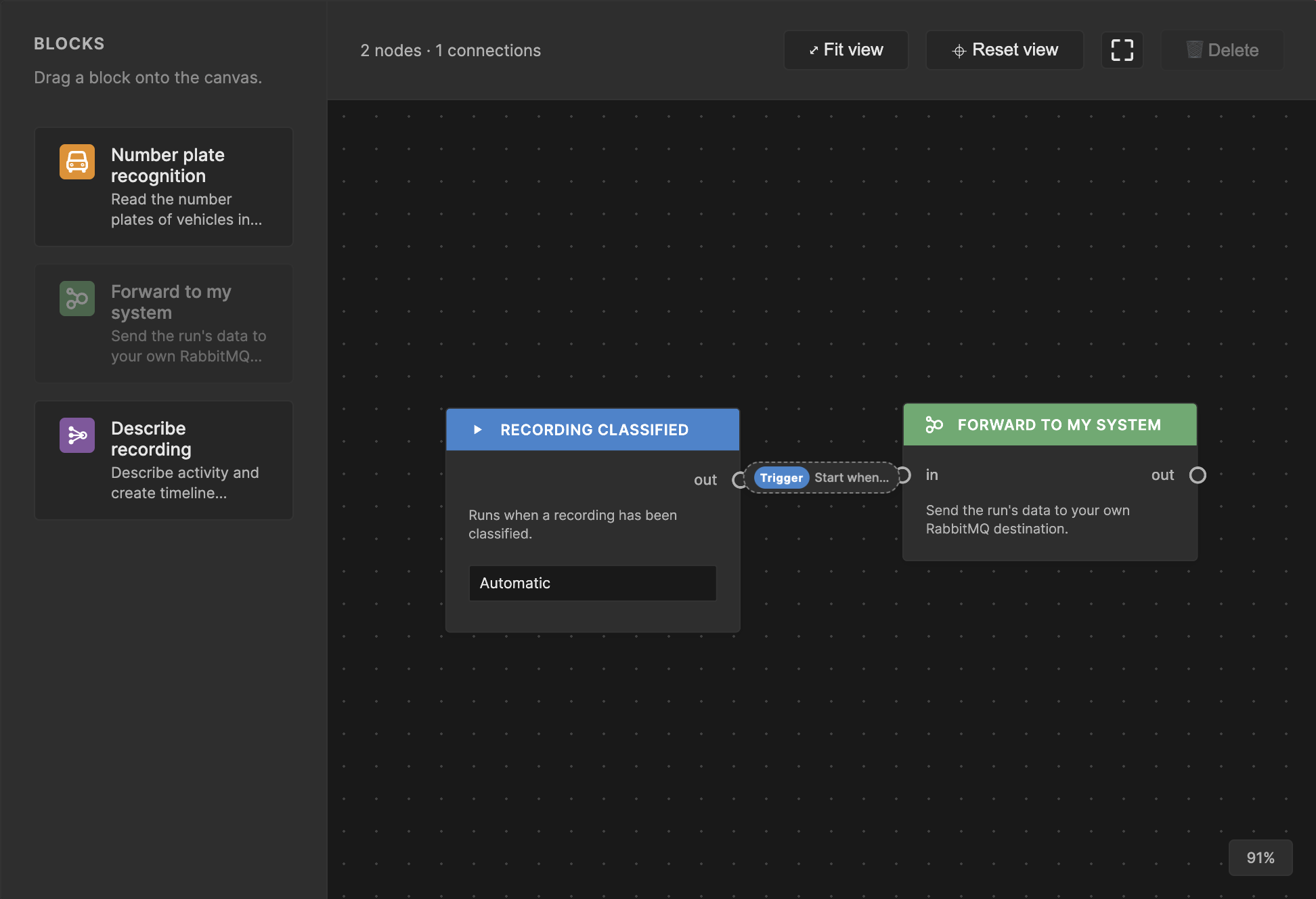
An example in UUG Hub’s workflow designer: a recording event connected to the external-worker forwarder. The custom model runs in the connected service. Source: External stages guide (Hub documentation).
Production workflow registration currently follows Helm deployment configuration; the visual designer is not yet the established production deployment path. The workflows engine and required workers must be enabled, as must the forwarder for external execution. Hosted availability depends on the service scope.
UUG therefore offers control over which models run and how their results participate in the recording workflow. That control includes responsibility for model quality, inference capacity, retries, monitoring and support; it is not evidence that a custom model is automatically more accurate.
Alta is not integration-free or closed by definition. Its product documentation describes open APIs, and its technical documentation covers rule-driven webhooks and API integration responsibilities.
The useful comparison is the integration contract. Sending an event notification, retrieving video through an API and returning structured processing results into an application’s timeline are different operations. The supported triggers, payloads, permissions and result presentation matter more than an “open” label.
Resilience depends on the recording and backup paths
Cloud management, local recording and off-site recovery are separate properties. Alta’s documented local-plus-backup model means a WAN outage should not be confused with the disappearance of every locally stored recording. It also does not establish that the full cloud operator experience remains available offline.
For an Alta proposal, offline recording, access to local history, interrupted backups and recovery after reconnection should be confirmed for the actual camera or Cloud Connector configuration. Alta Access door-controller outage behaviour should not be treated as evidence for Alta Video behaviour.
Agent can record locally independently of Hub connectivity. In a wider UUG deployment, disk capacity, upload retry behaviour, persistence availability and later Hub visibility determine how useful that independence is. A remote Vault or Hub introduces different dependencies from services located at the camera site.
A WAN outage, failed camera, damaged disk and central-service outage are not interchangeable. Off-site backup helps with footage already copied; it cannot protect footage that was never captured or had not yet reached the backup destination.
Neither a managed subscription nor Kubernetes replicas, on their own, establish the required recovery time.
Investigation and evidence deserve their own comparison
Alta Video provides a managed web and mobile experience for live video, playback, search and event handling. Its integrations with the wider Alta platform can be important for organisations coordinating video with access control, subject to the products and licences involved.
Hub provides a workspace for devices, recordings, notifications, cases and workflows. That is not a claim that the two products have identical search semantics, operator tools or access-control coverage.
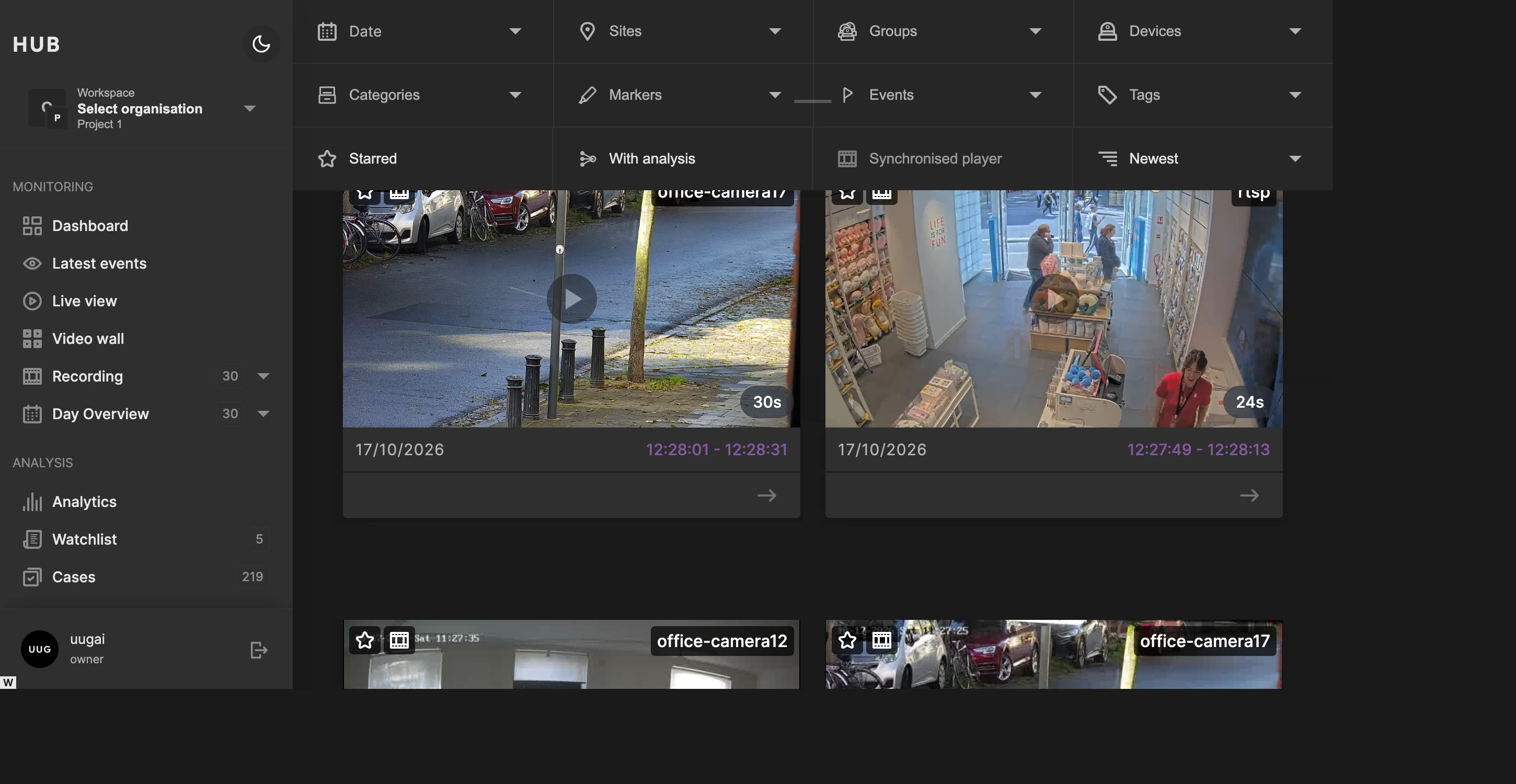
UUG Hub’s recording browser. Application screenshot from the Hub recordings guide (Hub documentation), illustrating one deployment rather than an equivalent Alta Video configuration.
Evidence integrity is also not a feature unique to one side. Alta documents verification of exported video and accompanying metadata, including signature verification and certificate checks. UUG documents MP4 integrity verification (Hub documentation), with origin assurance dependent on appropriate signing keys rather than a shared default.
The export format, verifier, recipient’s tools, identity of the signer and handling process all matter. A valid signature is not, on its own, a complete chain-of-custody process or a guarantee of legal compliance.
Compare the complete operating cost
An Alta proposal should distinguish video licences, cloud-native cameras or Cloud Connector hardware, local recording capacity, cloud retention, Storage Connect, support and any additional Alta services.
A UUG proposal should distinguish component licences or subscriptions, hosted-service scope, edge compute, central services and the infrastructure operated by the customer or partner.
For either architecture, the complete cost includes:
- Camera-site compute, local disks, replacement hardware and network maintenance.
- Recording retention, backups, restoration tests and external storage charges.
- WAN traffic for remote playback, exports, backups and recovery after interruption.
- Integration engineering, analytic processing and external service fees.
- Monitoring, upgrades, operator training and a clear escalation path.
Local recording with selective backup has a different traffic profile from continuous off-site replication. A cost comparison needs the same camera count, recording profile, retention and recovery requirements before a per-channel figure becomes meaningful.
Agent being open source does not make the complete UUG offering free. Alta being managed does not remove every site-level operating cost.
Which approach fits which organisation?
Avigilon Alta Video is a compelling fit when the priority is a supported cloud video service: central web and mobile operations, packaged analytics, camera reuse through the supported connector model, and integration with a broader security ecosystem.
UUG is a compelling fit when the video architecture and AI processing need to be composed: separately placed capture and persistence, component-level lifecycle control, or workflows that embed custom AI models and return their results to Hub.
The storage requirement alone may not decide the outcome, because Alta documents external storage options too. The sharper distinction is whether the organisation wants a supported service configuration or needs to own more of the system composition and its operating model.
There is no need to invent a universal winner. The defensible choice is the one whose camera support, operator experience, data paths, integration contracts and commercial responsibilities match the actual deployment.
This comparison does not imply a native Alta-to-Hub connector, automatic recording migration or round-trip analytics integration. For another managed-service perspective, see Milestone Arcules vs UUG.
Sources and scope
Avigilon references checked on 18 November 2026:
- Avigilon Alta overview: product-family scope and the distinction from Unity.
- Alta Video cloud software: managed video operations, analytics and integration positioning.
- Cloud Connectors for Alta Video: third-party camera paths, on-site processing and storage.
- Alta Video Cloud Storage: local recordings with configured cloud backups.
- External cloud storage: S3-compatible destinations, backup schedules and bandwidth controls.
- CIFS backups: additional local copies and Storage Connect licensing.
- Rule webhooks and API integration best practices: supported integration mechanisms and maintenance responsibilities.
- Export verification: exported-file integrity and origin checks.
UUG architecture and capabilities are described in How it works, Deployments, Agent’s Hub connection (Agent documentation) and Hub workflows (Hub documentation). Confirm current device support, licence terms, data handling and service commitments before procurement.